MacBook Neo Review: One Week With Apple's ₹60K Laptop (And Why The Tech Bros Are Wrong)

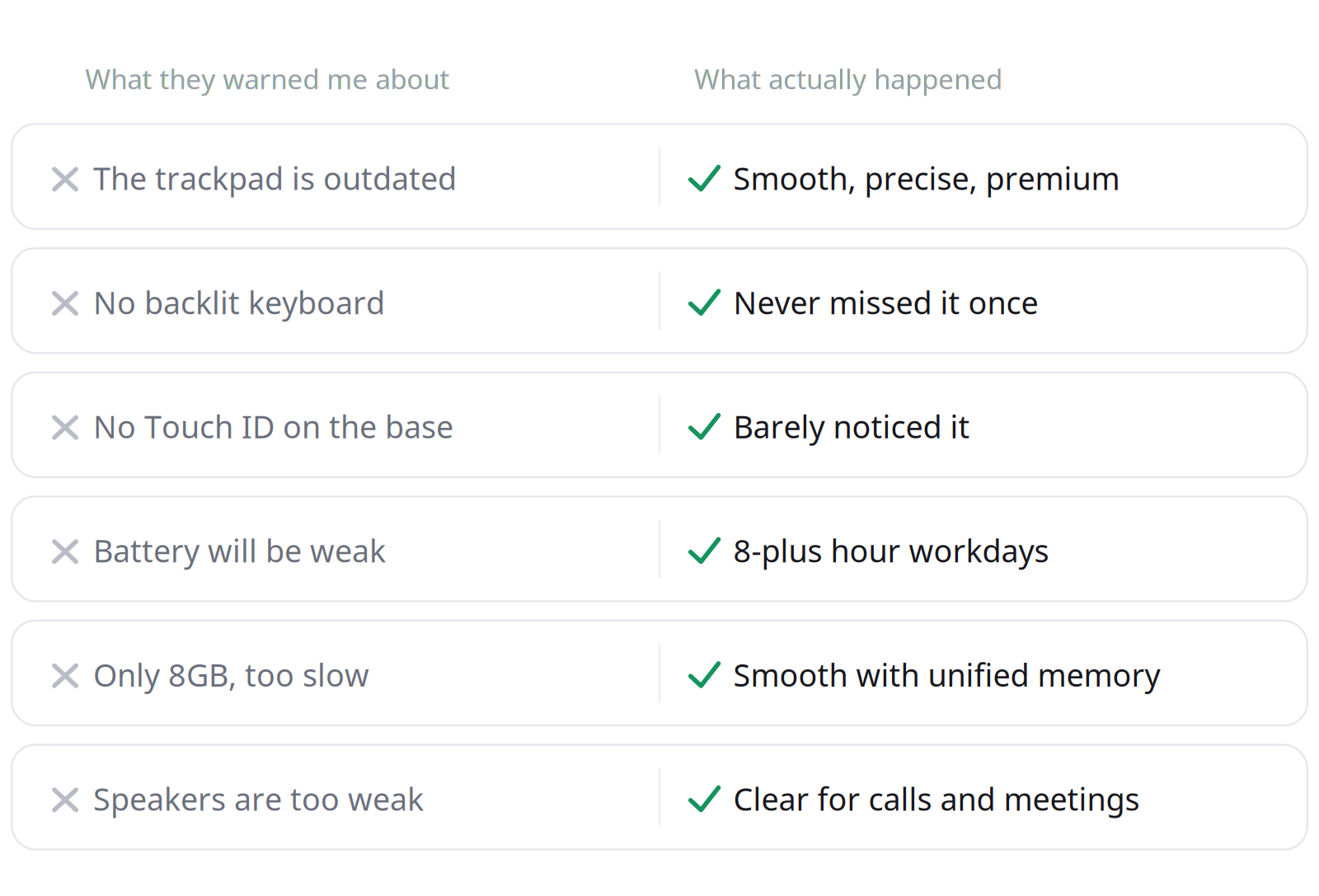
Quick verdict: The MacBook Neo is Apple's first sub-₹60,000 laptop, powered by the A18 Pro chip from the iPhone 16 Pro, and after a full week of real work on the base 8GB model, I am calling it: this thing punches way, way above its price tag. The internet handed me a list of dealbreakers before I bought it. One week later, almost none of them survived contact with reality. Let me spill the tea.
What is the MacBook Neo, in one line?
The MacBook Neo is Apple's cheapest-ever laptop (₹59,900 in India, $599 globally), built around the A18 Pro chip, a 13-inch Liquid Retina display, and 8GB of unified memory, running full macOS 26 Tahoe with Apple Intelligence. It is not an Air. It is not a Pro. It sits one rung below both, and that is the whole point.
The base spec sheet I actually bought
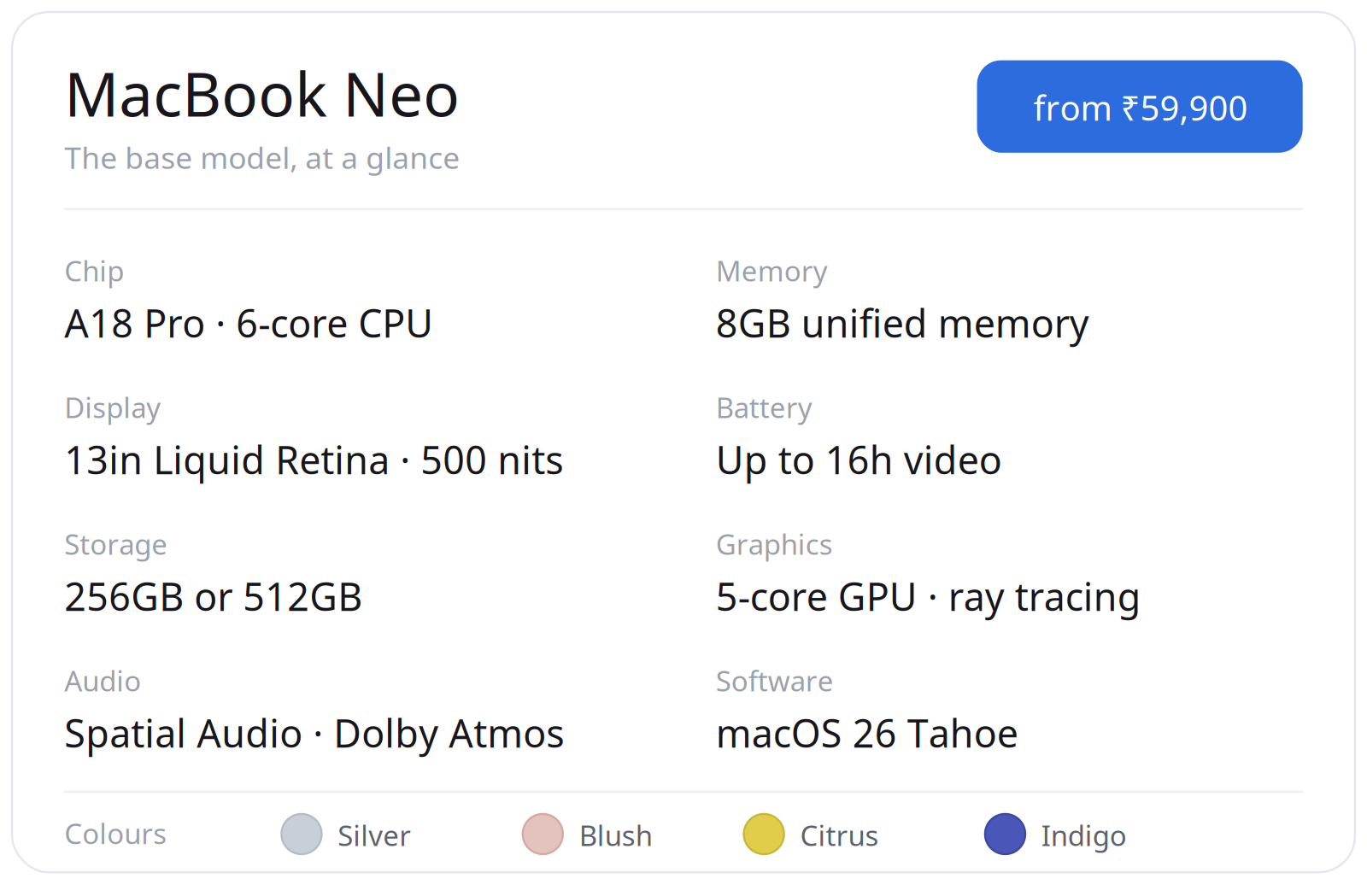
- Chip: A18 Pro (6-core CPU, 5-core GPU with ray tracing), the same silicon family as the iPhone 16 Pro
- Memory: 8GB unified memory
- Display: 13-inch Liquid Retina, 2408 x 1506, 60Hz, 500 nits
- Keyboard: Magic Keyboard, no backlight
- Trackpad: large Multi-Touch trackpad (no Force Touch, more on this below)
- Touch ID: only on the 512GB model, so my 256GB base has none
- Audio: side-firing speakers, Spatial Audio, Dolby Atmos, dual-mic beamforming
- Battery: 36.5Wh, rated up to 16 hours video, 11 hours web
- OS: macOS 26 Tahoe with Apple Intelligence
- Colours: Silver, Blush, Citrus, Indigo
Quick honest aside on the buying bit: I normally walk into an Apple Store or site, but the Neo became such a hit that the wait was painful. So I grabbed the base model off Amazon, stacked a couple of discounts, and landed close to ₹60K. No regrets on the route. Also, I am team Citrus now.
Is the MacBook Neo trackpad bad?
No. The MacBook Neo trackpad is excellent. Here is the actual technical detail everyone glosses over:
The Neo uses a traditional Multi-Touch trackpad with a physical hinge click, not the Force Touch trackpad found on the Air and Pro.
Force Touch trackpads use a Taptic Engine to simulate a click with haptic feedback instead of a real mechanical press. So yes, on paper, the Neo's trackpad is the "older" design.
In practice? I have daily-driven M1 through M4 Macs (most were my work laptops.. lol). I know exactly what a Force Touch trackpad feels like. And I am telling you the Neo's trackpad glides beautifully, tracks precisely, and feels premium. It is still leagues ahead of basically any Windows laptop touchpad in this range, which is the comparison that actually matters at ₹60K.
The mistake people make is benchmarking it against the Air and Pro and then acting betrayed. Stop doing that. Different tier, different price, different trackpad. As a dealbreaker, this was a complete non-event for me.
Does the MacBook Neo have a backlit keyboard?
No, the MacBook Neo does not have a backlit keyboard. This was supposedly the second horseman of the apocalypse.
Reader, I am a Customer Success and Account Manager. My job is roughly 80% writing emails and 20% pretending I am not writing emails. I type all day, often late into the night, and I genuinely did not miss the backlight.
Here is the part nobody mentions: the 500-nit Liquid Retina display throws enough light onto the keys that you can see them fine in a dim room. Between that and the fact that most of us touch-type anyway, the missing backlight quietly stopped being a problem by day two. Extensive night work, zero complaints.
Does the MacBook Neo have Touch ID?
The base MacBook Neo does not have Touch ID. Apple reserves Touch ID for the 512GB model, and I bought the 256GB base, so I knew this going in. Cue the outrage.
But if you actually use a Mac, you know how this works. Every fresh boot or restart requires your password regardless of Touch ID. The fingerprint sensor only kicks in afterwards, when the machine locks during a session. So the real-world cost of not having it is much smaller than the spec sheet suggests.
My setup: lock timer set to a couple of minutes, but I keep the machine awake for long stretches while I am actually working, which as a heavy user is most of the time. And when I am done for the day, I shut it down properly like a responsible adult, instead of leaving it perpetually sleeping like a goblin. Result: I type my password maybe a handful of times a day, and it costs me roughly two seconds each time. Not a dealbreaker. Barely a speed bump.
Is the MacBook Neo battery good?
Yes, the MacBook Neo battery is genuinely good. Apple rates the 36.5Wh battery at up to 16 hours of video and 11 hours of web browsing, and in my real mixed-use workday (browser, email, calls, project tools) I comfortably pulled 8-plus hours without anxiety.
I will say what we are all thinking: have you used a Windows laptop in this price band lately? The ones that promise "all-day battery" and tap out by lunch? The Neo just quietly works through a full workday. The A18 Pro's efficiency cores are doing a lot of unsung heavy lifting here.
Is 8GB RAM enough on the MacBook Neo?
For most everyday and professional workflows, yes, 8GB is enough on the MacBook Neo, because of how macOS handles unified memory. This is the spec that sends the comment section feral, so let me nerd out for a second.
The 8GB here is unified memory, shared on-package between the CPU and GPU, with aggressive memory compression and smart allocation by macOS. It does not behave like 8GB of RAM on a Windows machine. Apple's architecture swaps and compresses so efficiently that the practical headroom feels larger than the number implies.
My real test: I ran multiple AI tools in the browser, several browser windows, my emails, and project management tools all at once, and it stayed smooth. When I pushed past 20-plus tabs, yes, I felt the lag. But it was still gentler than the equivalent meltdown on a comparable Windows machine, and the fix is embarrassingly simple: be organised and close tabs you are not using. Treat 8GB with a little respect and it treats you back.
Caveat, because I am not a liar: if your daily work is heavy video editing, large local AI models, or 50 Chrome tabs as a lifestyle, this is not your machine. Buy up the stack. For everyone else, relax.
But isn't the A18 just an iPhone chip?
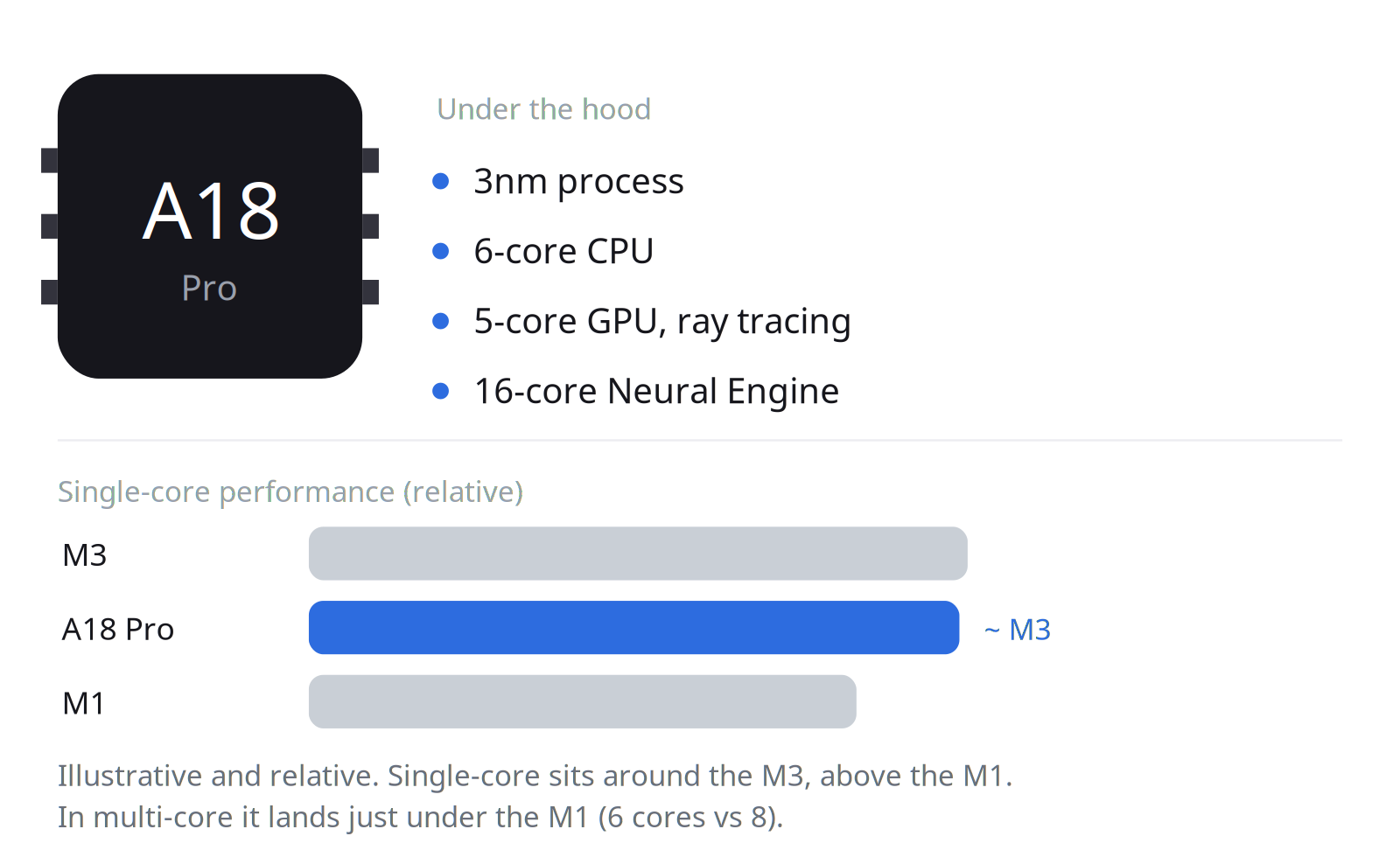
Yes, the A18 Pro is the same chip as the iPhone 16 Pro, and that is exactly why the Neo is so capable. The "just a phone chip" framing is backwards, and here is why.
Apple's A-series silicon has spent years quietly embarrassing full-size laptop processors. The A18 Pro is built on the same 3nm process as the M-series, packs a 6-core CPU, a 5-core GPU with hardware ray tracing, and a 16-core Neural Engine for on-device AI. In single-core performance it lands right around the M3, the chip Apple was shipping in actual MacBooks barely a year ago. So when you say "it's just a phone chip," what you are really saying is "this laptop runs on silicon so good they put it in a flagship phone."
Silicon does not have an ego. The A18 Pro does not wake up sad that it ended up in a laptop instead of a phone. It just does the work, sips power, and stays cool doing it.
The real story was never "Apple put a phone chip in a laptop." It is that phone chips got so absurdly good that one of them can comfortably run a Mac. That is not a downgrade.
Are the MacBook Neo speakers good enough?
Yes, the MacBook Neo speakers are good enough for real work. The Neo uses side-firing speakers with Spatial Audio and Dolby Atmos, plus a dual-mic array with directional beamforming. For back-to-back meetings and calls they were clear and loud enough, and people on the other end picked me up cleanly through Neo's mics.
Are they going to replace a proper speaker setup for music? No.
For a workday of calls and video? Completely fine.
MacBook Neo vs a Chromebook: what is the difference?
The big difference is the operating system. A Chromebook runs ChromeOS, which is essentially a browser with ambitions. The MacBook Neo runs full macOS 26 Tahoe, the same desktop OS as every other Mac, with the entire Mac app ecosystem and Apple Intelligence on board.
That is the headline. For the first time, the "affordable laptop" option does not force you onto a stripped-down OS. You get the real thing, the real ecosystem, real desktop apps, Continuity with your iPhone and iPad, the whole walled garden, at a near-Chromebook price. That is not a small deal. That is the deal.
Who is the true MacBook Neo user?
The true MacBook Neo user is someone who lives in browsers, documents, email, calls, and the Apple ecosystem, and who wants real macOS without paying Air or Pro money. Specifically:
- Communication-heavy professionals: customer success, account management, sales, ops, support. People who write, call, and coordinate all day. (Hi, it's me.)
- Students: the education pricing makes this almost unfair to the competition.
- Anyone wanting a second or backup Mac that is light, pretty, and capable without being precious.
- First-time Mac buyers who want into the ecosystem without remortgaging anything.
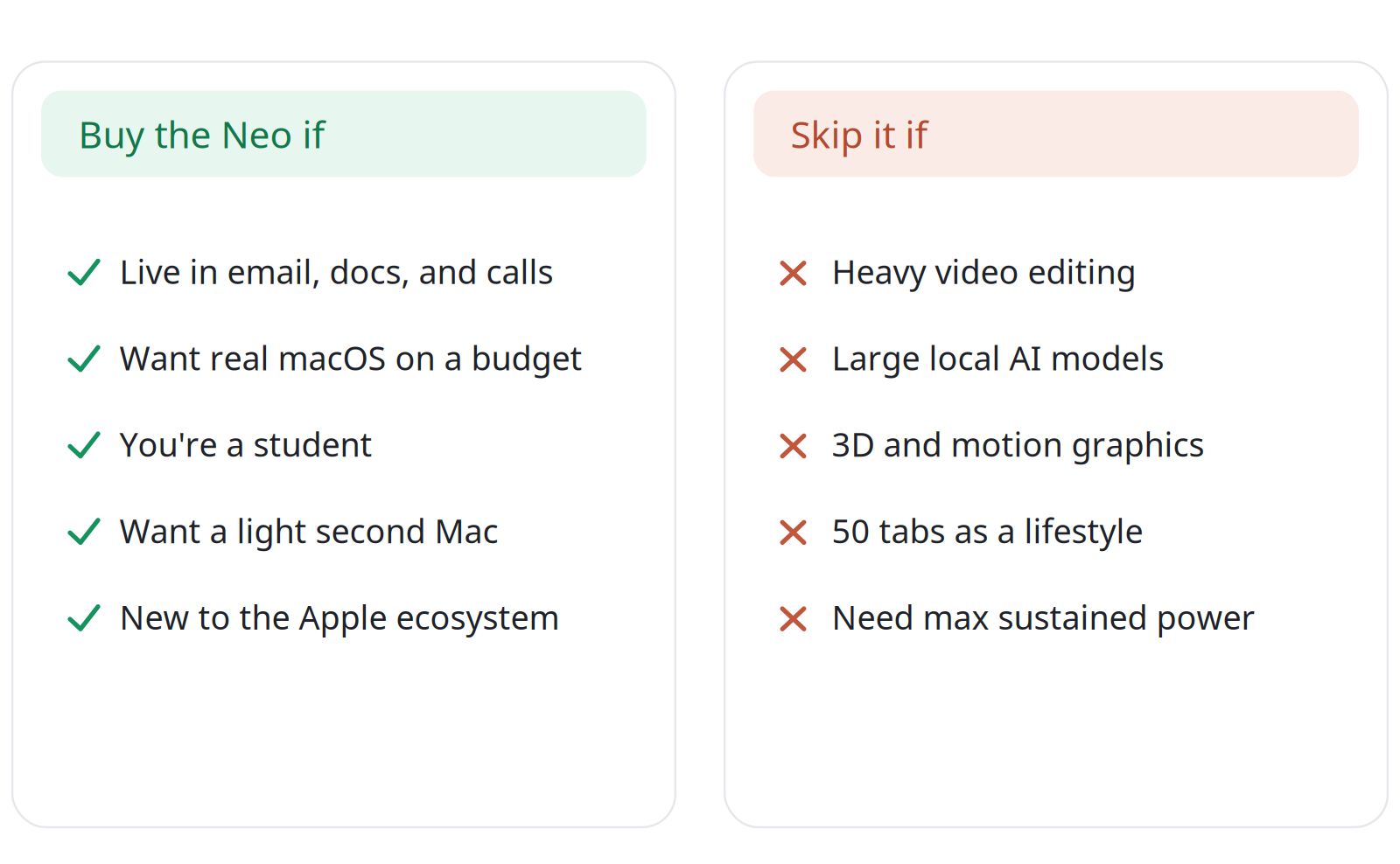
It is not for video editors, 3D artists, or people running heavy local AI workloads. Those folks know who they are, and they were never the audience.
Why I actually bought it ?
Here is the honest backstory. I bought the Neo as a backup machine for an M5 Mac I am planning to buy. I have a past laptop spillage trauma, and I would rather not expose an expensive machine to the daily gauntlet of heat, dust, non-AC rooms, and general environmental chaos. The plan: let the pricey M5 live a soft, protected life at home, and let the affordable, fearless Neo come out into the world with me.
Plot twist: I am starting to wonder if the Neo is just... enough. It is pretty, it performs, it does the job, and it cost me ₹60K. I deliberately have not loaded it up with AI automation tools or agent workflows, because that is not what this machine is for, and it is still doing more than I asked of it.
So will I still buy the M5? Obviously yes. I cannot miss out, I have a problem, we do not need to talk about it. But the fact that the Neo made me genuinely pause and ask "do I even need to?" tells you everything about how good this little laptop is.
Is the MacBook Neo worth it in 2026?
Yes, the MacBook Neo is absolutely worth it in 2026 for the right user. For around ₹60,000 you get genuine Apple Silicon performance, full macOS, all-day battery, a lovely 13-inch Liquid Retina display, and entry into the Apple ecosystem. The trade-offs (no backlit keyboard, no Touch ID on the base model, a non-Force-Touch trackpad, 8GB ceiling) are real, but for everyday professional and student work they range from "minor" to "I forgot it was a thing."
To the tech bros confidently declaring it dead on arrival because of a spec sheet they never lived with: respectfully, you reviewed the box, not the laptop. Spend a week actually working on the thing, then come talk to me.
MacBook Neo FAQ
It starts at ₹59,900 with student discounts for the base model. I picked mine up close to ₹60K on Amazon after discounts.
The A18 Pro, the same chip family as the iPhone 16 Pro, with a 6-core CPU and 5-core GPU. It is the first time Apple has put an iPhone-class chip in a Mac. Single-core performance lands roughly around M3 territory, with multi-core slightly behind the original M1 due to fewer cores.
No. You rely on ambient light and the bright display. In practice it is a non-issue for most people.
No. Touch ID is only on the 512GB version. The base 256GB model does not have it.
For browsing, email, calls, documents, and light multitasking, yes, thanks to unified memory and macOS memory management. Heavy creative or AI workloads will want more.
Very. If your day is email, calls, docs, and coordination, it is more than enough and it is a joy to use.
Buy the Neo if you want maximum value and your work is everyday tasks. Step up to the Air if you need Force Touch, a backlit keyboard, more memory headroom, and more sustained performance.
Pretty, capable, fearless, and just enough to make me question my own M5 plans.
Follow for more, this is techteaaa, signing off.